StackPOS logoStackPOS
15-day free Business trial

Offline-first POS software for Philippine businesses

Sell fast. Stock right. See every branch.

Connect checkout, inventory and business operations for your grocery or retail store. Supported cash sales keep moving during an internet outage after your register is set up and synced.

No payment needed to start. No automatic charges.

Runs offline·Multi-branch·Tax settings·Owner controls

15 days to make it yours

Try StackPOS in your own store.

Get the Business plan free for 15 days. Add your products, make sales, track stock, and try purchasing and promotions with your team.

Start my 15-day trial →

No payment needed to start. No automatic charges.

Your free Business trial includes

branch
1
registers
2
users
5
  1. Create an account and verify your email.
  2. Set up your store and start using StackPOS.
  3. Choose a paid plan when you’re ready.

After 15 days, subscribe to keep making sales. Your records stay available to view, and your store data carries over when you subscribe. Optional paid add-ons are separate.

The problem

Running a shop shouldn’t feel this hard

Most retailers run their business across three to five disconnected tools. The result: inventory gaps, billing errors, and zero real profit visibility.

No stock visibility

You don't know what's in stock, what's moving, or what's expiring until it's too late to act.

Manual day-end reporting

End-of-day done in registers and spreadsheets, no live numbers, no multi-branch rollup.

Disconnected software

Billing, stock and accounts don't talk to each other, so the numbers never quite agree.

There’s a simpler way, one system instead of five.

One unified platform

Run your entire business from here

StackPOS connects every operational layer, so when a sale happens, your stock updates, your books reconcile, and your profit report refreshes. All automatically.

Sell from one screen, counter, online or delivery
Purchase orders linked straight to stock and payables
Every taka in and out visible in one P&L
Multi-outlet view: per branch and consolidated
Sales and tax totals from posted business records
Explore all features
Is StackPOS right for you?

Built for operators, not just basic billing

StackPOS is a serious operations platform. Here’s who gets the most from it, and who might not need it yet.

StackPOS is for you if…
You manage stock and want to control purchases from one system
You need accounting and operations data in the same place
You run multiple outlets, or plan to grow beyond one
You want real profit visibility, not just top-line sales
You're in retail, food or distribution and need real control
It may not be the fit if…
You only need a basic biller and nothing more
You don't track stock or manage inventory at all
You want the cheapest possible tool, with no depth
You run a one-person stall with very low volume

Not sure where you fall? We’ll tell you honestly, no pressure.

Talk to our team →
Core capabilities

Everything a growing business needs

Simplify operations, boost sales, and scale your store with confidence.

SA
Sell anywhere

POS, online sales and delivery, all in one synced system.

CI
Control inventory

Real-time stock with smart reorder and expiry alerts.

AO
Automate operations

Purchase orders, stock transfers and reconciliation on autopilot.

GC
Grow customers

Customer records, loyalty points, and memberships.

FV
Finance & VAT

Posted accounts, profit and loss, and balance sheets.

BR
Built for reliability

Offline-first billing and bank-grade security.

Product walkthrough

See StackPOS in action

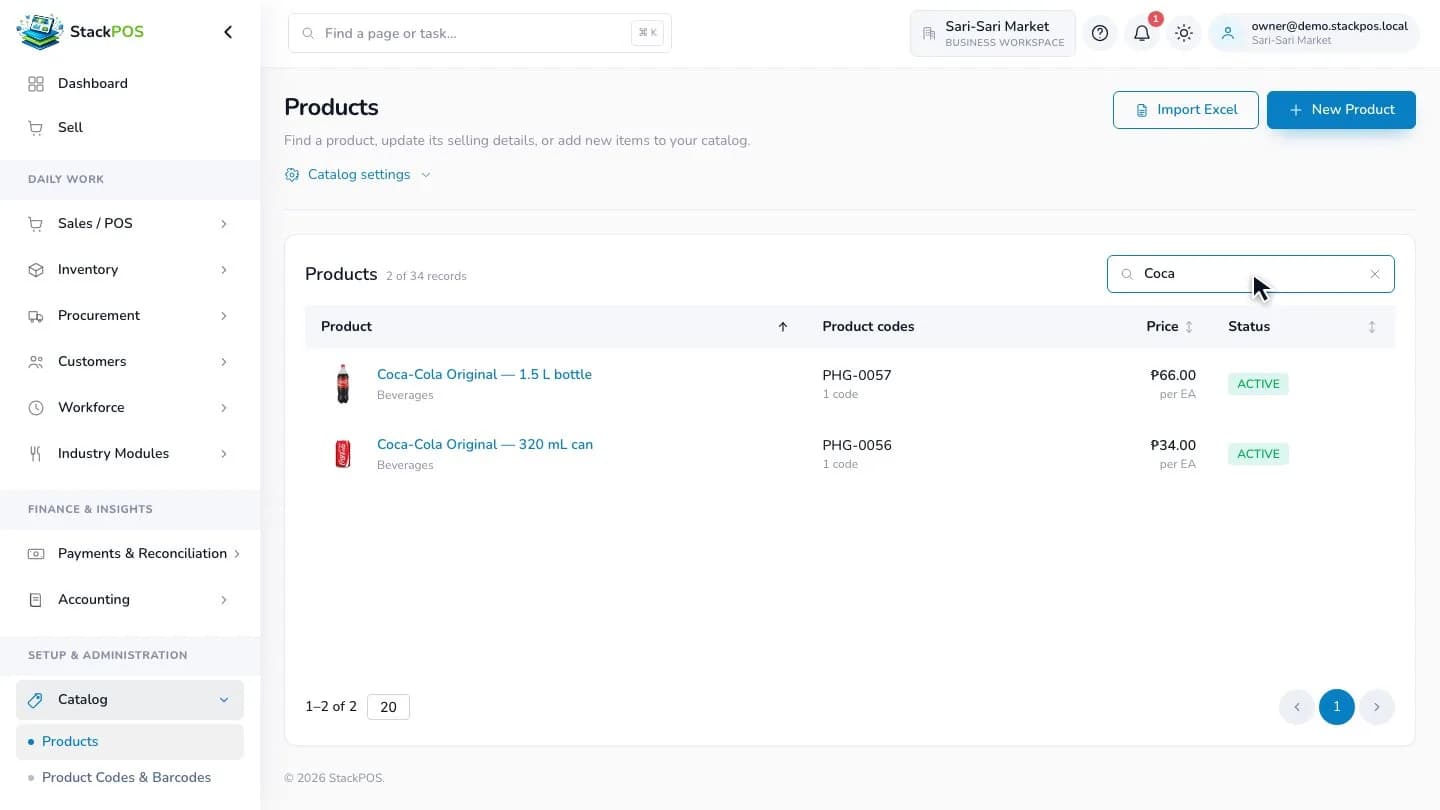
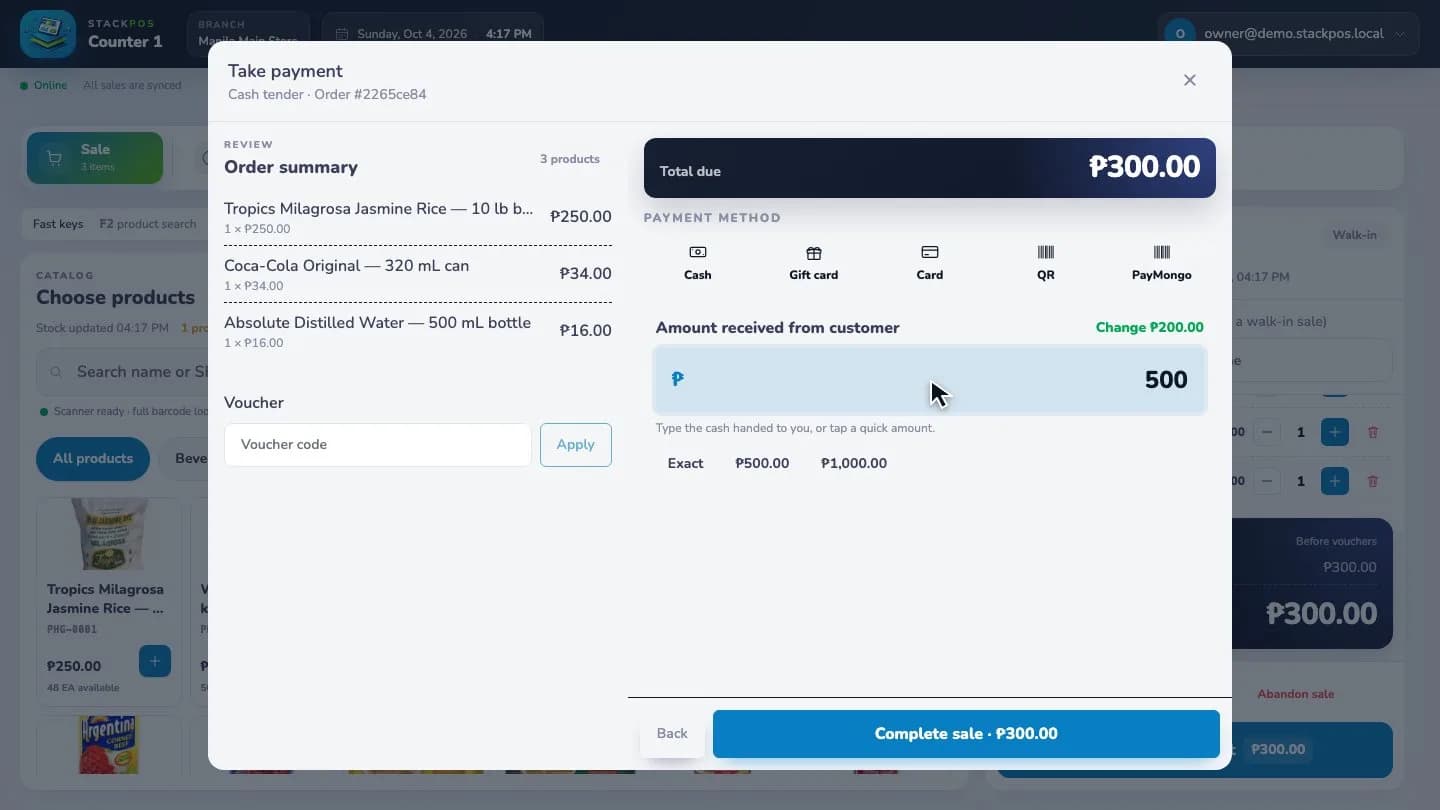
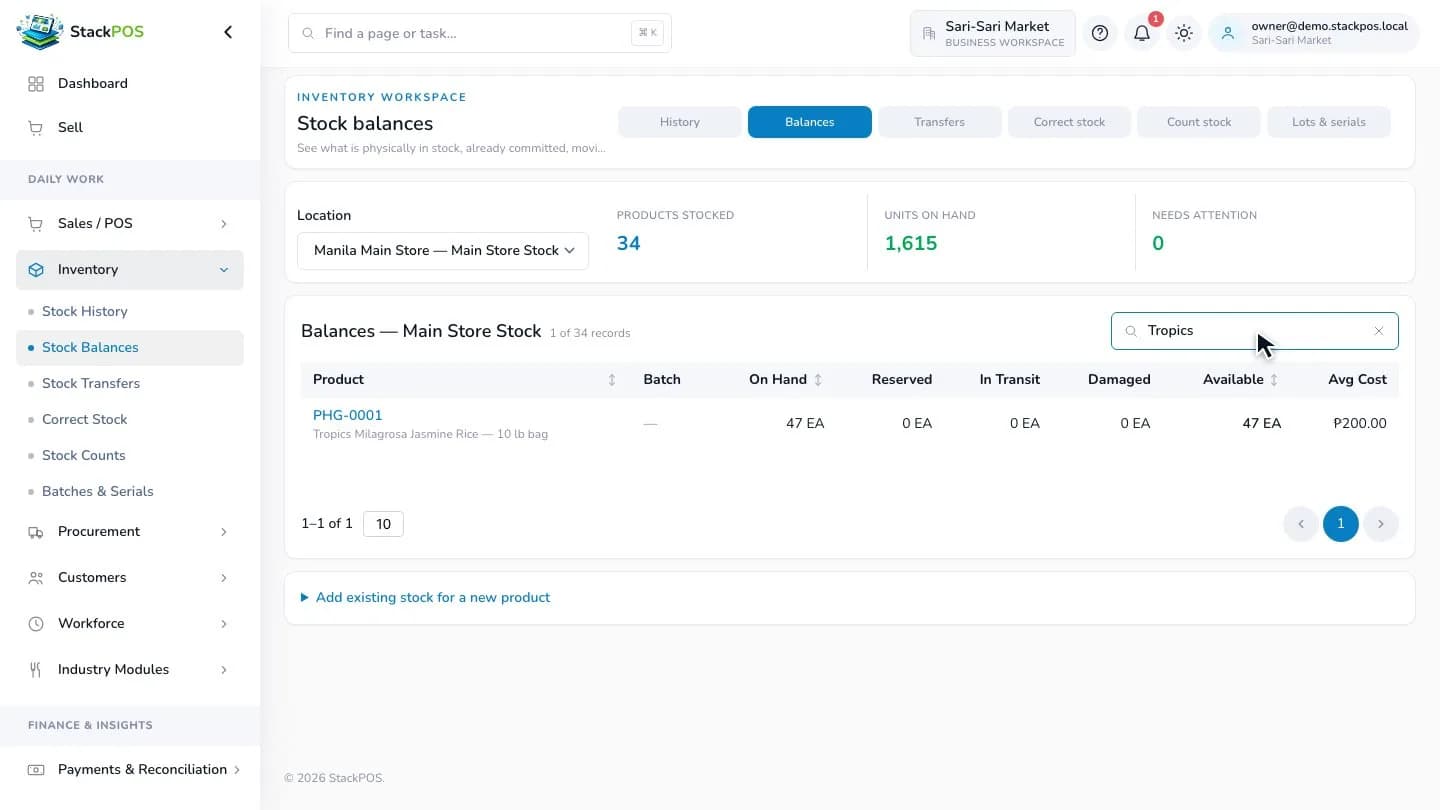
From your first sale to checkout, stock balances and daily reports. See how it all connects in one workspace.

1 minute 20 seconds · Captioned · Music includedRecorded in the StackPOS app using sample store data.
Offline-first by design

The internet goes down. Your tills don’t.

Scanning, pricing, promotions and printing run on the terminal itself. Every bill is saved locally and syncs to HQ the moment the connection returns, in order, with a full audit trail.

No lost bills, no manual re-entry after an outage
Day-end still balances: HQ sees the true picture once synced
How offline mode works
Scroll to run the outage drill
Store internet · Connected
All 3 tills in sync with HQ
Till 01
●Online · Synced
Bills this hour42
Till 02
●Online · Synced
Bills this hour38
Till 03
●Online · Synced
Bills this hour51
1 · Connected
2 · Internet drops
3 · Tills keep billing
4 · Reconnect & sync
Offline-first by design

The internet goes down. Your tills don’t.

Scanning, pricing, promotions and printing run on the terminal itself. Every bill is saved locally and syncs to HQ the moment the connection returns, in order, with a full audit trail.

No lost bills, no manual re-entry after an outage
Day-end still balances: HQ sees the true picture once synced
How offline mode works
Store internet · Connected
All 3 tills in sync with HQ
Till 01
● Online · Synced
Bills this hour42
Till 02
● Online · Synced
Bills this hour38
Till 03
● Online · Synced
Bills this hour51
1 · Connected
2 · Internet drops
3 · Tills keep billing
4 · Reconnect & sync

Pricing

Simple plans. Room to grow.

Start with a 15-day Business trial. Paid plans have flat monthly prices in Philippine pesos.

Free trial

Try the Business plan for 15 days before choosing a paid plan.

₱0for 15 days

1 branch · 2 registers · 5 users

  • Offline-first checkout
  • Products and stock tracking
  • Cash, card, and QR payment methods
  • Receipts and register shifts
  • Sales history and refunds
  • Customer records and loyalty
  • Gift cards, vouchers, and store credit
  • Customer display with cart and payment QR
  • PayMongo for GCash, Maya, and QR Ph
  • Staff roles and permissions
  • Pricing and promotions
  • Purchasing and suppliers
  • Multiple warehouses and stock transfers
Starter

The essentials for your first store.

₱799/ month

1 branch · 2 registers · 5 users

  • Offline-first checkout
  • Products and stock tracking
  • Cash, card, and QR payment methods
  • Receipts and register shifts
  • Sales history and refunds
  • Customer records and loyalty
  • Gift cards, vouchers, and store credit
  • Customer display with cart and payment QR
  • PayMongo for GCash, Maya, and QR Ph
  • Staff roles and permissions
View plan →
Most popular

Business

Manage sales, purchasing, and growing operations.

₱1,499/ month

3 branches · 6 registers · 25 users

  • Offline-first checkout
  • Products and stock tracking
  • Cash, card, and QR payment methods
  • Receipts and register shifts
  • Sales history and refunds
  • Customer records and loyalty
  • Gift cards, vouchers, and store credit
  • Customer display with cart and payment QR
  • PayMongo for GCash, Maya, and QR Ph
  • Staff roles and permissions
  • Pricing and promotions
  • Purchasing and suppliers
  • Multiple warehouses and stock transfers
View plan →

Enterprise

See the full picture across your business.

₱2,499/ month

5 branches · 15 registers · Unlimited users

  • Offline-first checkout
  • Products and stock tracking
  • Cash, card, and QR payment methods
  • Receipts and register shifts
  • Sales history and refunds
  • Customer records and loyalty
  • Gift cards, vouchers, and store credit
  • Customer display with cart and payment QR
  • PayMongo for GCash, Maya, and QR Ph
  • Staff roles and permissions
  • Pricing and promotions
  • Purchasing and suppliers
  • Multiple warehouses and stock transfers
  • Accounting reports
  • Payment reconciliation
  • Dashboard analytics
  • Single sign-on and security policies
View plan →

Choose 1, 12, 24, or 48 months during checkout. Longer terms include a base-plan discount.

Why StackPOS

StackPOS vs. other POS software

See how StackPOS fits your business and what to check when comparing other products.

Feature
StackPOS
Other POS software

Offline checkout

StackPOSSupported cash sales continue after register setup and sync when you reconnect.
Other POS softwareCheck what still works offline and how sales sync afterward.

Branches and staff access

StackPOSPlan-based branch capacity with staff permissions and access by location.
Other POS softwareCheck branch limits, extra-location costs, and staff permissions.

Inventory and purchasing

StackPOSStock tracking; purchasing and multiple warehouses with Business and Enterprise.
Other POS softwareCheck whether stock, suppliers, and purchase orders share one system.

Accounting and business reports

StackPOSEnterprise includes posted accounts, profit and loss, balance sheets, and dashboard analytics.
Other POS softwareCheck which reports are included and whether accounting needs a separate tool.

GCash, Maya, and QR Ph

StackPOSConnect your own PayMongo account for supported online customer payments.
Other POS softwareCheck supported payment methods, provider setup, and payment confirmation.

Customer display

StackPOSShow the customer’s cart, total, and payment QR beside the register.
Other POS softwareCheck whether purchases and payment instructions appear on a customer screen.

Restaurant, service, and payroll tools

StackPOSOptional add-ons for restaurant workflows, service work orders, and HR/payroll.
Other POS softwareCheck add-on availability, pricing, and how they connect to the POS.

Subscription choices

StackPOSPHP pricing with included capacity and 1-, 12-, 24-, or 48-month terms.
Other POS softwareCheck the billing currency, contract term, capacity limits, and extra charges.

StackPOS features depend on your plan and add-ons. Other products vary; their column lists questions to check before you choose.

Offline-first
billing that survives load-shedding
All-in-one
POS, stock, accounts & HR in one system
Tax settings
Sales receipts & accounting reports
Multi-outlet
one HQ view across every branch
FAQ

Frequently asked questions

Can’t find what you’re looking for? Ask us directly. A human answers, usually the same day.

Contact us →

Yes. After your register is set up and synced, supported cash sales can continue during an internet outage and sync when the connection returns. PayMongo payments need an internet connection.

Yes. Your plan includes branch, register, and user capacity. You can manage stock and access for each branch and choose available add-ons as your business grows.

Connect your own PayMongo account in Payment setup. Customers can then pay supported checkout methods, with the payment QR shown on the customer display when available.

StackPOS includes setup for registers, barcode scanners, receipt printers, cash drawers, and customer displays. Compatibility depends on your device and connection; check Hardware setup before purchasing equipment.

Register and verify your email to start a 15-day Business trial with 1 branch, 2 registers, and 5 users. Set up your store without subscription payment, then choose a paid plan when you are ready. You can add products, stock, and staff from your workspace.

For grocery and retail owners

Practical guides for your next working day

Choose your POS, prepare for internet outages and build a stock routine that works across branches.

Browse all store guides
Get started today

Don’t just sell, sell smarter with StackPOS.

Try the Business plan free for 15 days with 1 branch, 2 registers, and 5 users. Set up your store and see how StackPOS fits your day.

No payment needed to start. No automatic charges.

Tax settings and receiptsMulti-outletOffline-firstProfit visibility