
Grocery and supermarket POS software in the Philippines
Connect barcode checkout, store inventory and branch operations. Supported cash sales can continue during internet outages after your register is set up and synced. Explore the workflows and test them with your own products.
What goes wrong in Supermarkets & Grocery
A supermarket loses money in three places at once: stock that walks out unrecorded, dairy and bakery that quietly age past their date, and a queue that gets long enough at 7pm that people put the basket down and leave. None of the three shows up on a till roll. They show up as a gap between what the ledger says you own and what is actually on the shelf.
The modules that matter most for Supermarkets & Grocery
Built for the way you sell
Produce, fish and meat sell by weight, scale barcodes and tare handled at the till.
The till picks the oldest batch automatically; near-expiry stock gets flagged for markdown.
Lookup stays instant whether you carry 5,000 items or 80,000.
Power and internet outages don't stop billing, bills queue and sync in order.
GRN at the gate catches shortages; landed cost keeps margin math honest.
Outlet P&L, top movers, expiry risk and cash variance, before the day-end call.
Why operators in Supermarkets & Grocery choose StackPOS
Offline-first, not offline-tolerant. Load-shedding does not stop billing: bills queue at the till and reconcile to head office in the order they were rung up.
Batch and expiry are native rather than an add-on. The till picks the oldest batch itself, so FEFO is what happens by default instead of what a cashier remembers.
One master price list from HQ with branch-level stock, so a promotion set on Sunday morning is live at every till on Sunday morning.
What you get out of it
Barcode lookup stays instant at 48,000 SKUs, so opening a third till is a choice rather than a necessity.
Near-expiry stock is flagged for markdown while it still has value, days before it becomes a loss.
Cycle counts with reason codes turn “we’re short again” into a number you can act on.
Billing, scanning and printing continue offline, and nothing is re-keyed when power returns.
GRN at the gate catches shortages while the truck is still in the yard.
Outlet P&L, top movers, expiry risk and cash variance in one evening view.
Asked by supermarket operators
Can’t find what you’re looking for? Ask us directly. A human answers, usually the same day.
Contact us →Can checkout continue if the internet goes down?
After the register is set up and synced, supported cash sales can continue locally and sync after reconnection. PayMongo payments need connectivity. Check pending receipts and any stock conflicts when the connection returns.
Can we manage stock across branches?
Yes. Choose a plan with the branch capacity and modules you need. Business and Enterprise include multiple warehouses and stock transfers. Receive and count goods at the correct location so balances reflect the stock physically held there.
What should we test before switching our store?
Verify opening stock and a small product catalog, then test checkout, receipts, returns, receiving and your hardware. Rehearse an internet outage on a prepared register. The time needed depends on your catalog, devices and staff; use the trial to check your own setup.
Other counters we build for
Shop & retailSee it tuned to your counter.
Book a 30-minute demo and we'll run StackPOS on products and workflows from your industry.
Inside the StackPOS app
From a grocery basket to your stock balance
These screenshots come from the real application with sample store data. They show the workflow you can rehearse during your trial.
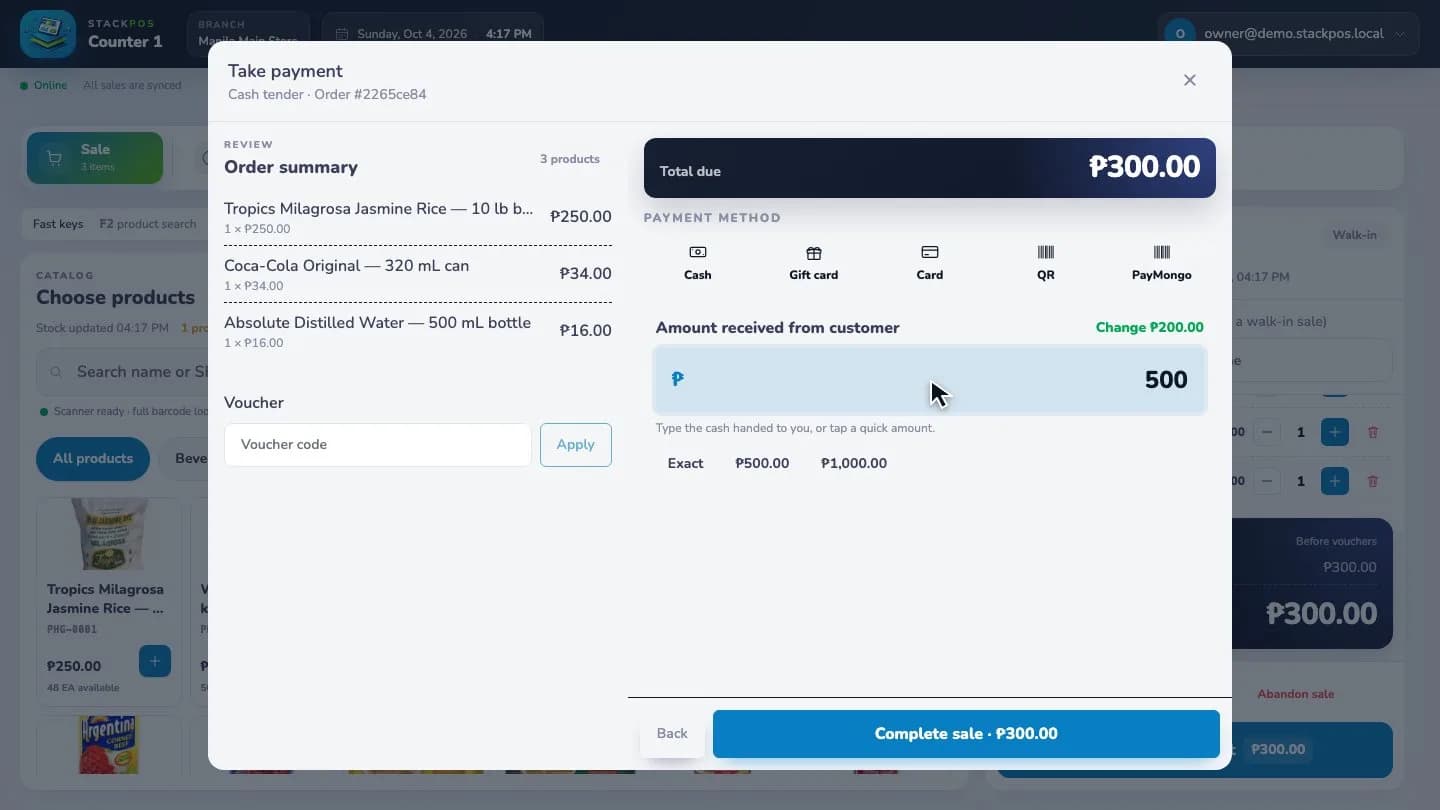
Complete a cash sale
Build a grocery basket, enter the cash received and check the change before completing checkout.
Sample data · Captured online
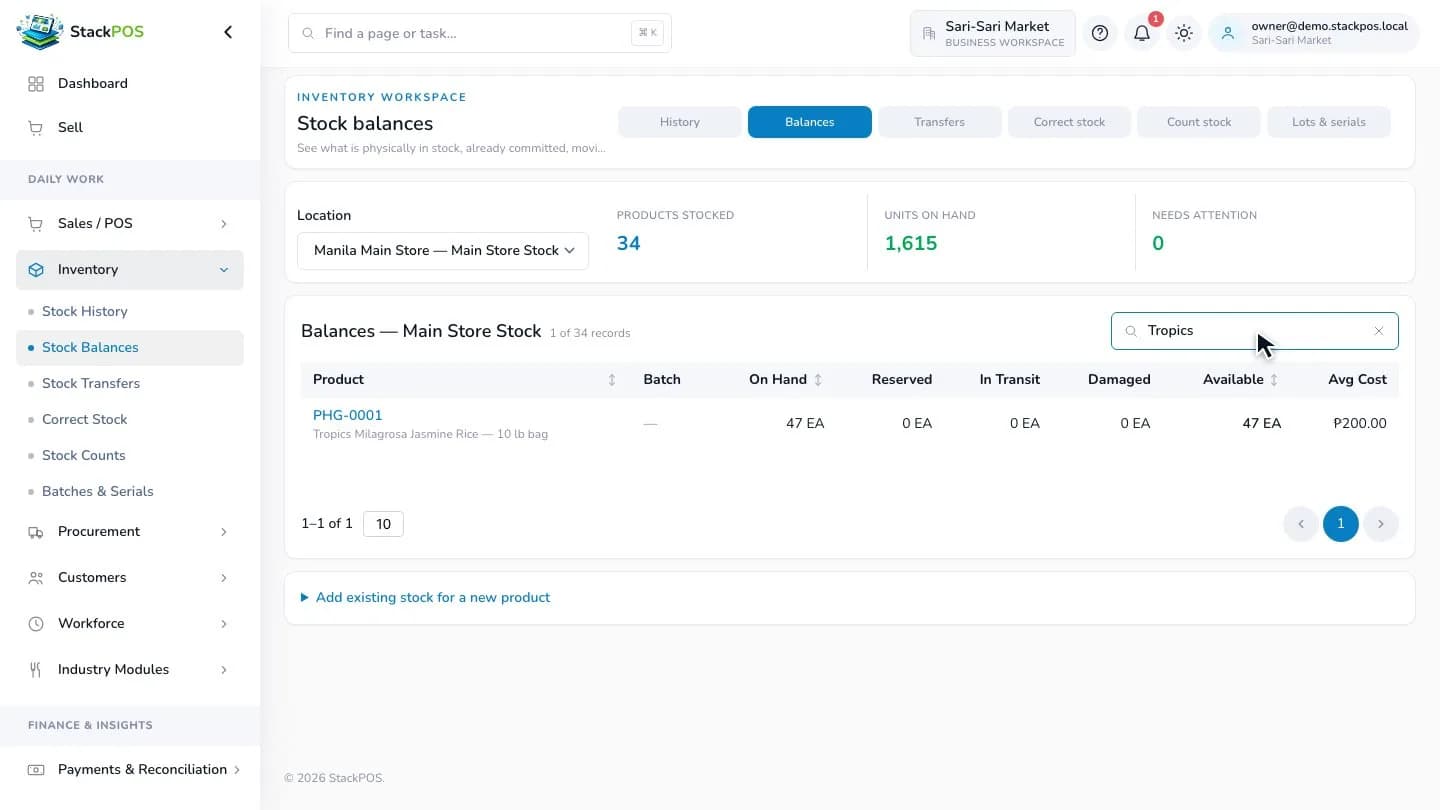
Check the stock at a location
Find a product in stock balances and review its on-hand, reserved, in-transit and available quantities.
Sample data · Captured online
Test your store's daily routine before switching
Bring your own products and devices into a trial. Verify opening stock before putting a register into daily use, and rehearse these tasks with your cashiers.
- Scan a basket with similar products and different pack sizes.
- Complete a cash sale, check the receipt and review the stock balance.
- Prepare and sync a register, then rehearse a supported cash sale during an internet outage.
- Receive a delivery and test a stock transfer if your chosen plan includes it.
- Check the exact printer, scanner and cash drawer you plan to use.